This post may contain affiliate links. Please read our disclosure policy.
So many challenges can come with screen time, but the top question I hear is: How Can I Limit My Child’s Screen Time Effectively? Managing your child’s screen time can feel like an uphill battle. With devices constantly competing for their attention, it’s easy to see how screen time can quickly become excessive. Screens and blue light can affect their sleep, behavior, and overall development.
Don’t worry. There’s good news. You can help your child find a healthier screen time balance by setting practical strategies and age-appropriate limits. Let’s dive into how to effectively limit your child’s screen time so they can spend more time being productive, creative, happy kids!

Not All Screen Time is Created Equally
First, I want to say that not all screen time is the same.
There is a huge difference between our kids watching a drawing tutorial and drawing along with it compared to playing Roblox.
There is a huge difference between watching YouTube videos about science or playing YouTube games (like “Guess this movie character by the song they sing”) compared to just scrolling through videos.
The key is to monitor what they are doing. While I’ve created a post about the easiest & best parental apps for monitoring their devices, I find that just telling them they can use the living room TV for these things is the best and easiest solution. This room & TV are in the middle of the house (out in the open), and everyone can watch along with them or do the activity with them. Plus, I can see exactly what’s going on.
Why Screen Time Management is Important for Kids
Excessive screen time doesn’t just impact a child’s physical health; it also affects their emotional and social well-being. Studies show too much screen exposure is associated with lower psychological well-being, particularly in older kids and teens.
According to research published in Preventive Medicine Reports, children who spend more than one hour per day on screens may experience:
- Increased feelings of anxiety or depression.
- Difficulty concentrating and less creativity.
- Reduced physical activity leads to health issues like obesity.
Other studies found that increased screen time was associated with the following:
- Alterations in brain structure, particularly in areas related to cognitive function and social processing
- Behavioral problems like increased aggression, impulsivity, and difficulty regulating emotions, especially when content is violent or fast-paced
- Poorer social skills
- Delays in language development for younger children
- Depression
- Anxiety
- Lower cognitive levels in children
- Poorer performance on developmental screening tests
- Sleep disturbances and difficulties falling asleep
We know that screens can be addictive, which is why it’s so important to set clear screen time limits. Our kids need to learn healthy habits they can use their entire lives (because I can’t see screens going away), so we need to be their teachers.
Average Screen Time Usage Right Now
Research found that many preteens and teenagers spend more than half of their awake time using screens.
“According to most research, children, particularly those between ages 8 and 12, spend an average of 4-6 hours a day on screens, with teenagers often spending 8-9 hours daily, not including time spent on screens for schoolwork; this includes watching TV, playing video games, and using mobile devices.”
This has changed a lot in the past ten years: Teens now spend an average of 8-9 hours daily on screens, two hours more than in 2015. Preteens (children aged 8 to 12 years) spend about 5 ½ hours daily on devices, up an hour from a decade earlier.
How Much Screen Time is Too Much? (Age-Based Guidelines)
So, what are the recommended limits? Here are some guidelines to keep in mind:
- Under 2 years old: NONE
No screen time, except video chatting. Screens (Television shows, movies, iPads, etc.) can cause serious language delays. Studies found that children ages 0-2 years old who spent two hours a day using electronics & screens were SIX TIMES more likely to face language delays. (Here are ten activities to help a toddler with a speech delay.) - Ages 2-5: ONE HOUR PER DAY.
No more than one hour of high-quality programs daily. (Example: watching interactive, positive, educational shows like “Daniel Tiger’s Neighborhood, Sesame Street, Bluey, Alphablocks, Octonauts, Super Why, etc.) Bonus points if the adult is watching it with them so you can discuss what you are seeing. - Ages 6 – 9: TWO HOURS PER DAY.
Consistent limits to ensure screen time doesn’t interfere with sleep, physical activity, or family time. - Ages 10 and older: TWO HOURS PER DAY (of recreational screen time)
Limit their “entertainment” screen time to 1-2 hours daily. At this age, I don’t mind when they use their screens for social Connection (texting a friend, video-chatting a friend, playing a game with a friend), but I don’t like “idle scrolling.”- IMPORTANT NOTE: At this age (and all ages), monitor their usage and activities! It’s so important. They are still too young to know what they can or cannot do, and our job is to teach them. When you find them doing/watching something they shouldn’t be on, use it as a teaching moment. Sit them down, talk to them, explain why it’s wrong, how they can prevent it, and then explain the consequences if they do it again.
Remember to enforce these limits in a way that works for your family’s routine. For example, in our home, we’ve found that banning screens during school mornings ensures our kids stay on schedule without distractions.
RELATED: I found the best parental control apps to monitor children’s screens
See examples of each guideline below.
Screen Time Rules for 2-year-olds through 5-year-olds:
Screen time rules for 3-year-olds and screen time rules for 4-year-olds may differ a bit from screen time rules for a 5-year-old, but these give you a general idea:
The 1-Hour Rule with Educational Shows (Use this list of educational shows for some great ideas!)
Morning Routine:
- Show: “Daniel Tiger’s Neighborhood” (20 minutes)
- Scenario: After breakfast, the child watches one episode (approximately 20 minutes) while the parent sits nearby. During the episode about sharing, the parent talks to the child:
- Parent: “Did you see how Daniel let O the Owl borrow his toy? What do you think about that?”
- Child: “That was nice!”
- Parent: “Yes, it feels good to share, right? How could we practice sharing today?”
Afternoon:
- Show: “Bluey” (20 minutes)
- Scenario: During an afternoon break, the child watches two short episodes (approximately 20 minutes total) with their parent. In one episode about teamwork, the parent pauses briefly to ask:
- Parent: “Why do you think Bluey and Bingo needed to work together to build their tower? We can work together like that when we play later.”
Evening Wind-Down:
- Show: “Alphablocks” (10 minutes)
- Scenario: Before bath time, or maybe while you are cooking dinner, the child watches a short episode (10 minutes) focusing on letter sounds. The parent reinforces learning:
- Parent: “Can you say the letter sounds we just heard? Let’s find something in the room that starts with ‘B’ like in the show!”
Bonus Tips:
- Keep the viewing interactive by asking questions or singing along with the songs.
- Use themes from the show to inspire screen-free play (e.g., pretending to be underwater explorers like in “Octonauts” or building with blocks after “Alphablocks”).
- Aim to stick to a total of 1 hour, split across these sessions, and mix in non-screen activities like reading or outdoor play.
It seems so far off from what we are used to in this day & age, but it’s so much better for our children, their brains, their physical bodies, their emotional state, and their mental health.
Screen Time Rules for 6-9 year-olds.
Screen time rules for 3-year-olds and screen time rules for 4-year-olds may differ a bit from screen time rules for a 5-year-old, but these give you a general idea:
Guideline: Limit recreational screen time to 1–2 hours per day of high-quality content, ensuring it doesn’t interfere with sleep, physical activity, homework, or family time.
Sleep-Friendly Limits
- No screens 1 hour before bedtime: Create a nightly routine that includes reading, quiet play, or family conversations instead of screen time to help children wind down.
- Set a bedtime for devices: For example, all tablets and gaming consoles are “put to bed” at 7:30 PM and stay in a designated charging area overnight.
Encouraging Physical Activity
- Active before screen time: Establish a rule like “No screen time until you’ve played outside for 30 minutes or completed a physical activity such as biking, jumping rope, or practicing a sport.” (Download this free No Screen Time Until chart to make this easier!)
- Screen breaks every hour: If your child is watching TV or gaming, set a timer to ensure they take a 15-minute break to stretch, play, or move around.
Prioritizing Family Time
- Device-free dinners: Make family meals a time to talk, share stories, or play conversation games, keeping all electronics out of the dining area.
- Weekly family activity night: Example: Dedicate one night a week for family board games, movie nights, or outdoor activities (with no personal devices allowed) to promote bonding without screens.
Structured Screen Time
- Limit total daily screen time: For example, allow one hour of TV after school and 30 minutes of gaming after chores are done.
- Encourage Educational Gaming or Shows like Prodigy, Brain Pop, etc.
- Use earned screen time: Implement a system like this where screen time is earned through completing chores, homework, or reading (e.g., “30 minutes of reading earns 15 minutes of screen time”).
Tech-Free Zones
- No screens in bedrooms: To avoid late-night usage, make bedrooms a screen-free space, encouraging children to engage in non-digital activities like reading or creative projects.
- No screens during car rides under an hour: Use travel time for conversations, audiobooks, or road trip games instead of electronics. (I’d say an exception is longer travel. We loved using the Letter Factory to teach our kids their ABC’s (letters and sounds) on longer trips – here’s how I did it.)
These examples balance the benefits of screen time with the need for healthy habits and quality family interactions.
Practical Tips to Limit Screen Time Without Conflict
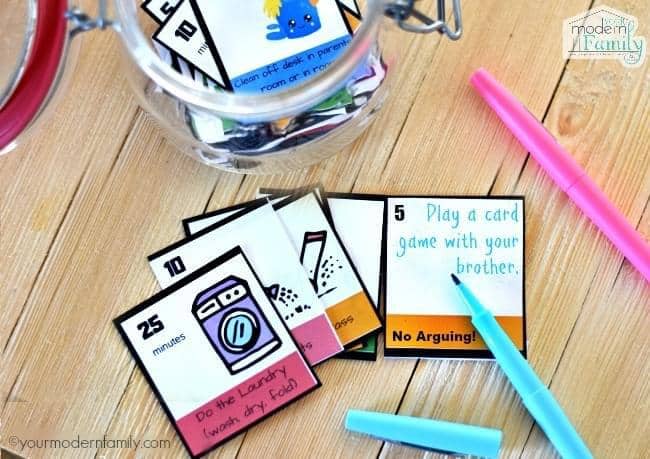
- Use Screen Time as a Reward: Our family’s “Swap Chores for Screen Time Cards” have been a game-changer. By earning screen time through completing chores or creative activities, our kids have learned the value of hard work and balance.
Tip: You can even add in your own ideas like, “Play a card game with your brother” or “Practice the piano for 20 minutes.”
- Create a “No Screen Time Until” List: Encourage kids to finish tasks like reading, playing outside, or helping around the house before they can access electronics. This free printable checklist has been a lifesaver in preventing morning or weekend screen binges.

- Establish Tech-Free Areas: Designate areas of your home as screen-free spaces. Some examples are the dinner table and their bedroom. These are simple rules that can be implemented today. It’s a great way to transition to less screen time, too. Plus, it fosters family connections and promotes better sleep. 🙂
- Set Time Limits with Technology: Many devices have built-in parental controls. Use apps like Bark or the “Screen Time” feature on Apple (this tutorial walks you through it) devices to set daily time limits and monitor usage. It is so easy! It can easily be changed (by you since you’ll set up a secret passcode), and it’s a great way to limit their time.
You can even set up “app limits,” so if your child likes Roblox, you can limit them to 30 minutes daily. If they get carried away on YouTube, limit the time to 20 minutes a day, etc..

- Be Consistent: Whatever rules you set, stick to them. Consistency helps kids understand expectations and reduces pushback.
- When it’s time to be done, use this trick to stop any arguments about ending screen time.
Fun Alternatives to Screen Time: Screen Free Ideas
Sometimes, the key to limiting screens is offering exciting alternatives. Here are a few screen-free ideas:
- Outdoor Activities: Play catch, ride bikes, or set up a backyard scavenger hunt.
- Creative Projects: Build with LEGO bricks, paint rocks, or craft something new.
- Reading Challenges: Encourage your kids to dive into a new book or start a family read-aloud session.
- Games and Puzzles: Board games, card games, or puzzles can be both fun and mentally stimulating.
- Here are 50 more Screen-Free Ideas
- AND… 60 Non-Screen Activities

We’ve found that they often forget about their screens once the kids start another activity.
Be Their Role Model
Kids mimic what they see. If we want our children to reduce their screen time, we need to model that behavior. Here are some ways to set a positive example:
- Limit Your Own Screen Use: Try setting specific hours when you unplug from devices, especially during family time. I aim to be off of screens from 3:30, when the kids come home from school, until 9:30, when everyone is in bed.)
- Prioritize Family Activities: Cook meals together, play games, or take a walk as a family. These moments not only reduce screen dependency but also strengthen bonds.
- Communicate Openly: Talk to your kids about why screen time limits are important. Share the benefits of a balanced lifestyle, like better sleep and more energy.
It Doesn’t Have to be All or Nothing.
Limiting screen time doesn’t have to be all or nothing. In fact, by teaching your kids how to use electronics in a healthy way, they can really get a lot out of their screens. They can be a great way to learn, socialize, and have fun… when done in moderation (like anything.)
It doesn’t have to be a battle. By setting clear guidelines, offering fun alternatives, and leading by example, you can help your kids develop a healthy relationship with technology. Remember, it’s not about banning screens completely but teaching balance and responsibility. And as you take these steps, you’ll likely find that your entire family benefits from spending less time on screens and more time connecting with each other.
Have you tried any of these strategies? I’d love to hear what’s worked for your family in the comments below!